

Presentations

Presentation
•
Computers
•
6th - 8th Grade
•
Practice Problem
•
Hard

Carianna Shelvin
Used 10+ times
FREE Resource
27 Slides • 2 Questions
1

2

Basic Functions
Presentation Software
3

- It is a software we use to create visual aids to accompany a speech or public presentation
- It is a software that allows multimedia integration
-How we make 'slideshows' or sequences or text and graphics
What is it?
4
Question:
What two programs can you think of that are NOT a presentation software?
ex: Microsoft Excel and Google Meets
5

Helps convey ideas clearly using text, images, charts, and multimedia.
Allows structuring content logically with slides, bullet points, and templates.
Makes presentations more engaging
It's Importance ...
6

Collaboration tool to enhance group work.
Contains themes, templates charts and tables
It has cloud based storage through Google drive
User-friendly Interface
Google Slides' Key Features
7
Question:
How do collaboration tools in Google Slides benefit group projects?
ex: I think that collaboration tools in Google slides can benefit group projects by allowing us to work on the project whenever.
8

9

10
Question:
How can you best correlate the function of a slide in presentation software to something in your present life?
ex. I can Best describe the function of a slide in presentation software as a sheet of paper in a notebook.
11

12

13

14
Question:
What is the difference between a template and a layout in presentation software?
15

The Can Do and the Cannot Do List
PRESENTATION SOFTWARE:
16

17

18

19
20
Question:
What effect does using high contrast colors on a presentation?
A: It makes the text harder to read
B:It distracts the audience
C: It improves readability and focus
D:It reduces the impact of the message
21

22

23

24
Multiple Select
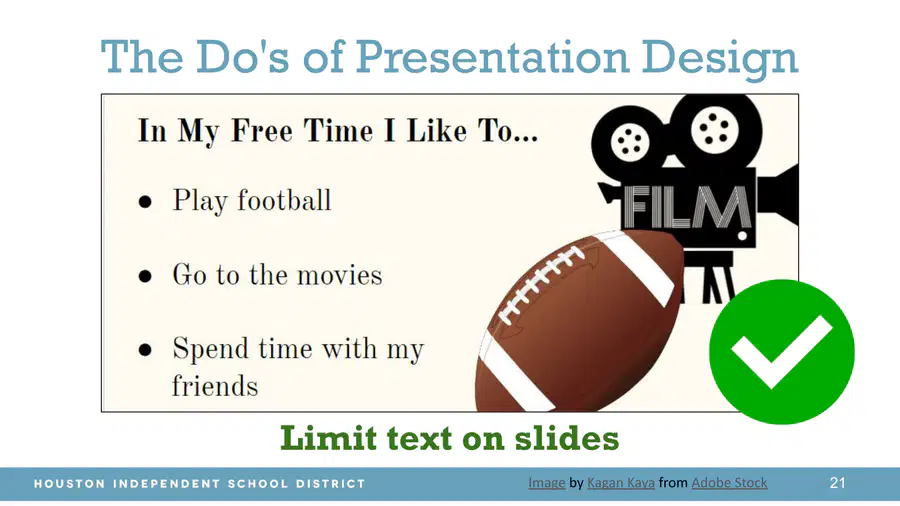
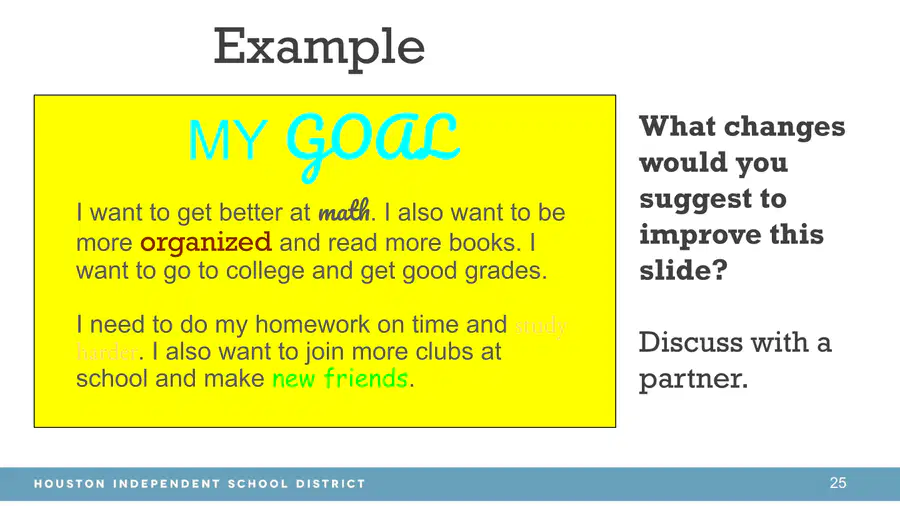
Which of the following is a recommended practice for a presentation design based on the images you just saw?
Limit text on slides
Do not overcrowd slides with text
Use distracting backgrounds
Use low-contrast colors
25
26
Multiple Select
How confident are you in using Google Slides? (A presentation software)
4
1
3
2
5
27

28
Using your About Me worksheet. Create a 6 slide presentation:
Title Slide
Free Time (3 things)
Favorite subject
Achievements
Goal in the next 12 months
Interesting or Fun Fact
When saving your presentation use "All About Me_[Your Name]"
29

Show answer
Auto Play
Slide 1 / 29
SLIDE
Similar Resources on Wayground

22 questions
What Careers Are Available in Information Technology?
Presentation
•
6th - 8th Grade
22 questions
Waves
Presentation
•
6th - 8th Grade
22 questions
Area of Circles
Presentation
•
6th - 8th Grade
22 questions
Multiplying and Dividing Integers
Presentation
•
6th - 8th Grade
22 questions
Figurative Language
Presentation
•
6th - 8th Grade
24 questions
🎯 Lesson 3: What is a Computer?
Presentation
•
6th - 8th Grade
21 questions
ICT or Computer Science?
Presentation
•
7th - 8th Grade
22 questions
STEMScopedia - Heat and Matter
Presentation
•
6th - 8th Grade
Popular Resources on Wayground
10 questions
Safety Day 2026 – Student Review

Quiz
•
9th Grade
21 questions
Continents and Oceans
Quiz
•
6th Grade
20 questions
Parts of Speech
Quiz
•
5th Grade
16 questions
Subject & Predicate
Quiz
•
5th Grade
25 questions
Multiplication Facts
Quiz
•
5th Grade
12 questions
Map Skills
Quiz
•
3rd Grade
22 questions
Continents and Oceans
Quiz
•
5th Grade
15 questions
Rounding Decimals
Quiz
•
5th Grade