

Y7 Lesson 7.6

Presentation
•
Computers
•
7th Grade
•
Practice Problem
•
Medium

Jolanda Edmond
Used 1+ times
FREE Resource
11 Slides • 7 Questions
1
Objectives
1. Explain the purpose of project plans for a software development project.
2. Know how to apply for a test plan.

2
Project plan & test plan
a structured approach to testing whether your solution works as expected
lays out a software-development project from start to finish
a document that describes the areas of a program to be tested
includes details of the tests to be applied to each area of the program - test data and expected results
program is broken down into smaller problems to solve
3
Multiple Choice
What is a test plan?
a backup plan in a program
a structured approach to fix error in a program
a plan to edit the whole program
a testing plan to add more bugs
4
Multiple Choice
Why test plan is important in making a software?
to make sure the outputs are different
to change any unwanted program
to make sure the program produces the expected output
to add more bugs in the software
5
Multiple Choice
In a test plan, the program is divided into smaller parts to solve the problems.
True
False
6
What areas included in a project plan?
what the software is expected to do
what individual sections are required
what inputs and outputs are required
how to test it
how to use the outcome of test to improve the final product
7
These individual problems can be explored using a flowchart.

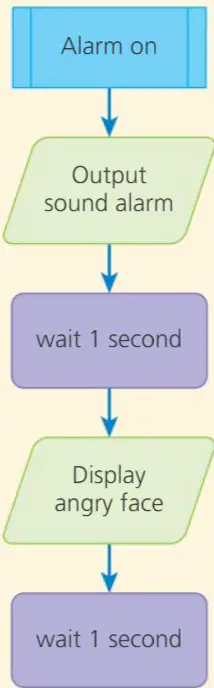

The use of sub-routines makes the flowchart easier to follow and understand.
It also splits the flowchart into smaller sections to test.
A test plan can be used to check the flowchart against what you expect to happen.
8
Multiple Select
What is the use of sub-routines in flowchart?
to make the flowchart easier to understand
combine the flowchart
to test the program
splits the flowchart into smaller sections
9
Fill in the Blanks

How many sub-routines are there?
Type answer...
10
Here is an example test plan for the flowchart.

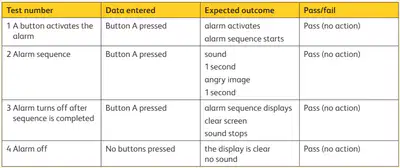
Once an algorithm on a flowchart works as expected, it can be used to write the program.
Then, the same test plan can be used to check that the program runs correctly.
11
Objectives
1.Understand how errors can be introduced into programs.
2. Know how to systematically identify and debug errors in text-based programs.
3. Follow, understand, edit and correct algorithms that are presented as flowcharts.

12
Key notes
test plan = help to find and fix errors in the flowchart and the program code
debugging = finding any errors in the code and fixing them
sequence = a set order of instructions or events
sequence determines the output
if the sequence is wrong, it can cause an error or an incorrect output

Can you spot the error in the sequence above?
13
Multiple Choice
What is debugging?
find mistakes
identify and fix errors
edit and change the flowchart shape
change the entire program
14
Multiple Choice
if the sequence is wrong, it does not cause an error or an incorrect output
True
False
15
To solve the error,
Can you spot the error in the sequence above?
look for the pattern in the sequence of colours
the sequence = red, blue, yellow repeated
using pattern recognition, you can see that the error is two blues next to each other
16
You can also apply pattern recognition to debugging program code.
For example, patterns can be used to check the sequence in a flowchart by following the flow from top to bottom and looking at the flowchart shapes.

In the flowchart shown on the right, the pattern is an output followed by a process. The sequence is:
display a large square
wait 0.5 second
display a small square
wait 0.5 second
display a chessboard
wait 0.5 second
If there was an error in the sequence, such as shapes in the wrong order, it would be obvious in the flowchart.

17
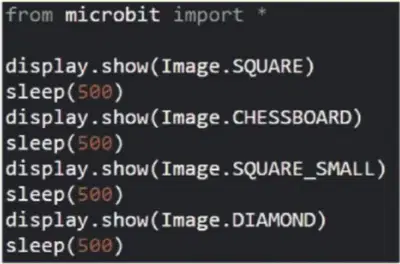
Here is the MicroPython code for the flowchart.
The pattern and sequence are visible but there is an error in the code.
Can you spot it?
18
Comparing the flowchart to the MicroPython can reveal where a pattern or sequence has been added incorrectly.
To do this, line up the flowchart with the lines of code.
The highlighted sections show where the errors in the sequence are. These lines of MicroPython code are not the same as the flowchart.
Once errors have been found, you can rearrange the sequence to fix the program.

Objectives
1. Explain the purpose of project plans for a software development project.
2. Know how to apply for a test plan.
Show answer
Auto Play
Slide 1 / 18
SLIDE
Similar Resources on Wayground

14 questions
Simple Machines
Presentation
•
7th Grade
12 questions
01.06 | Tone and Mood
Presentation
•
7th Grade
17 questions
Computer Software
Presentation
•
7th Grade
13 questions
Multiplying and Dividing Integers
Presentation
•
7th Grade
13 questions
Mesopotamia
Presentation
•
7th Grade
13 questions
Newton's Laws
Presentation
•
7th Grade
13 questions
Part, Whole, Percent Practice
Presentation
•
7th Grade
14 questions
The Treaty of Guadalupe Hidalgo
Presentation
•
7th Grade
Popular Resources on Wayground
10 questions
Safety Day 2026 – Student Review

Quiz
•
9th Grade
21 questions
Continents and Oceans
Quiz
•
6th Grade
20 questions
Parts of Speech
Quiz
•
5th Grade
16 questions
Subject & Predicate
Quiz
•
5th Grade
25 questions
Multiplication Facts
Quiz
•
5th Grade
12 questions
Map Skills
Quiz
•
3rd Grade
22 questions
Continents and Oceans
Quiz
•
5th Grade
15 questions
Rounding Decimals
Quiz
•
5th Grade