

Maze Game Scratch Lesson

Presentation
•
Computers
•
9th - 12th Grade
•
Practice Problem
•
Easy

ERICK SWALLOWS
Used 8+ times
FREE Resource
17 Slides • 3 Questions
1
Maze Game
2

Stand-up, Hand-up, Pair-up
3
Vocabulary
Programming- the process of preparing an instructional program for a device (such as a computer)
Iteration- a procedure in which repetition of a sequence of operations yields results successively closer to a desired result
Debugging- to eliminate errors in or malfunctions of ex.debug a computer program
Visual Programming Language- In computing, a visual programming language, also known as diagrammatic programming, graphical programming or block coding, is a programming language that lets users create programs by manipulating program elements graphically rather than by specifying them textually.
4
What is an iterative design process?
Use the internet to research the answer to the question and find a process that you want to use in today’s lesson. Write your iterative design process on a sticky note.
Share out our answers
5
Part 1: Programming the Original Maze Game (15 min.)
6

You can open this webpage in a new tab.
7
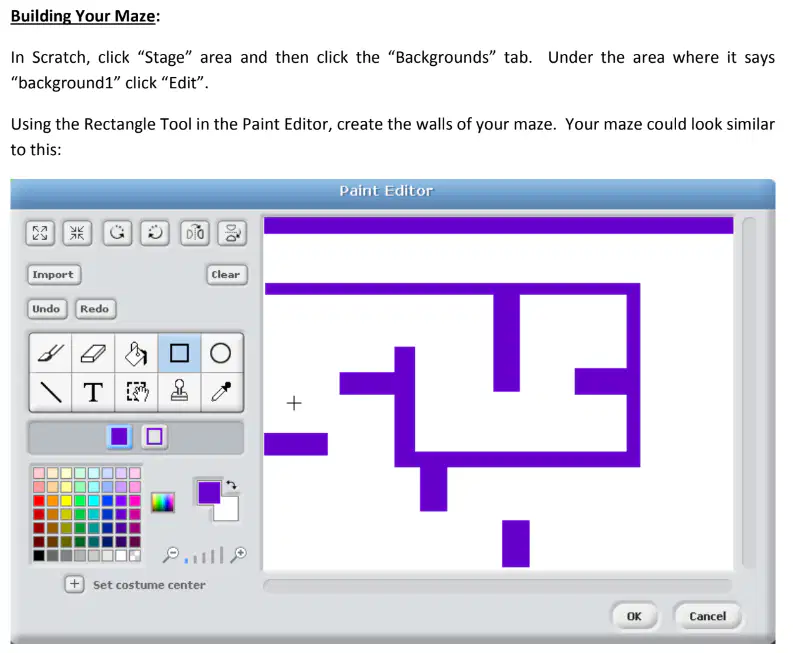
Step 1
8
Step 2

9
Step 3
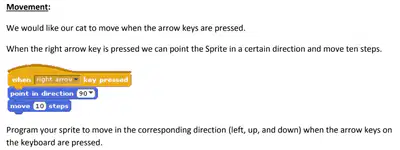
10
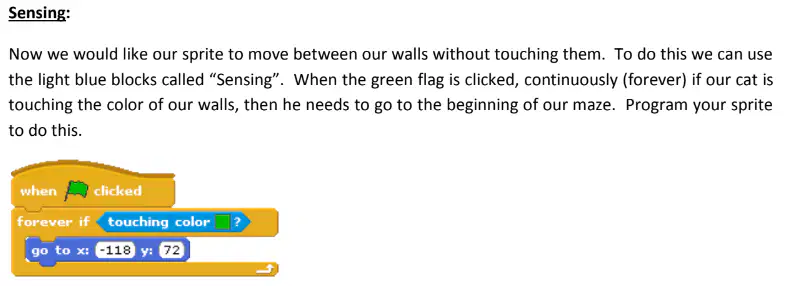
Step 4
11

Step 5
12
Time to submit your 1st version.
In Scratch go to File-> Save to your computer.
Then save that file to you Google Drive (rename it with you, your partners name a 1) and share it with Mr. Swallows.
13
“What parts of the design process have we completed?” What part of the process do we need to do next?
14
Step 6
Your group will partner with another group and you will let the other group play your game. After the other group plays the game, have them answer these peer review questions.
1. What was your favorite thing?
2.What was your least favorite thing?
3. Was there anything you wanted to do that the game wouldn't let you do?
4. What would you do to make the game better?
Step 7
Now take what you learned from the peer review and make your game better.
Repeat Steps 6 & 7 at least three times.
15

Consider the following upgrades
16
Time to submit your Final version.
In Scratch go to File-> Save to your computer.
Then save that file to you Google Drive (rename it with you, your partners name a F) and share it with Mr. Swallows.
17
Exit Ticket
18
Open Ended
How do you think your answers to the peer review questions affected other groups' maze game?
19
Open Ended
How did using the iterative design process affect your final program?
20
Open Ended
What steps do you think a good iterative design process includes?
Maze Game
Show answer
Auto Play
Slide 1 / 20
SLIDE
Similar Resources on Wayground

15 questions
Algebra 1 Systems of Equations- Word Problems
Presentation
•
9th - 12th Grade
14 questions
Strength Training
Presentation
•
9th - 12th Grade
14 questions
Graphing Absolute Value Functions with Transformations
Presentation
•
9th - 12th Grade
16 questions
Computer Science Principles Unit 3 Review
Presentation
•
9th - 12th Grade
12 questions
AP Computer Science Principles Procedures
Presentation
•
9th - 12th Grade
15 questions
Exponential vs. Linear: Growth and Decay
Presentation
•
9th - 12th Grade
15 questions
How to support claims in your writing
Presentation
•
9th - 12th Grade
15 questions
Loans intro
Presentation
•
9th - 12th Grade
Popular Resources on Wayground
24 questions
PBIS-HGMS Day 10

Quiz
•
6th - 8th Grade
10 questions
HCS SCI 03 Summer School Review 3
Quiz
•
3rd Grade
11 questions
Home Scope
Quiz
•
7th - 8th Grade
15 questions
HCS SCI 05 Summer School Assessment 3 Review
Quiz
•
5th Grade
35 questions
Lufkin Road Middle School Student Handbook & Policies Assessment
Quiz
•
7th Grade
18 questions
Geo 11.3 Area of Circles and Sectors
Quiz
•
9th - 11th Grade