

Unit 9.3 - Lesson 1

Presentation
•
Computers
•
10th Grade
•
Practice Problem
•
Medium

David Kang
Used 2+ times
FREE Resource
9 Slides • 3 Questions
1
Unit 9.3:
Coding and testing: Game Development for the Micro:bit
2
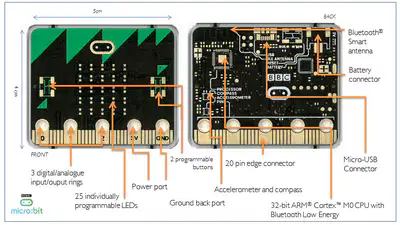
Micro:bit is a small microprocessor
Can store and run one program at a time
Programs developed with MakeCode (block-based) or MicroPython (text-based)
Inputs: A button, B button, accelerometer, microphone, light sensor, temperature sensor
Outputs: LED display, buzzer
Connects to external components via GPIO pins and crocodile clips
Proper MicroPython syntax is crucial
Syntax errors shown on display with sad face and line number
3
Multiple Choice
What are the two programming platforms used for developing micro:bit programs?
Scratch and JavaScript
MakeCode and MicroPython
Arduino and Raspberry Pi
C++ and Java
4
Multiple Choice
Which of the following is NOT an input for the micro:bit?
Accelerometer
Buzzer
Light sensor
A button
5
6
7
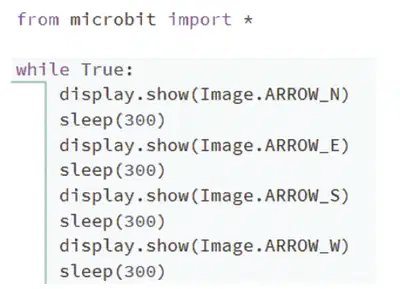
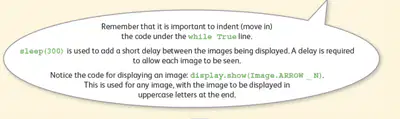
Type this into the editor?
8
Open Ended
What did you see?
9

10
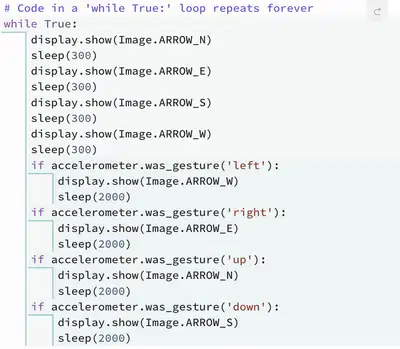

Add the following code that allows the Micro:bit to sense the accelerometer
11
Here's a challenge:
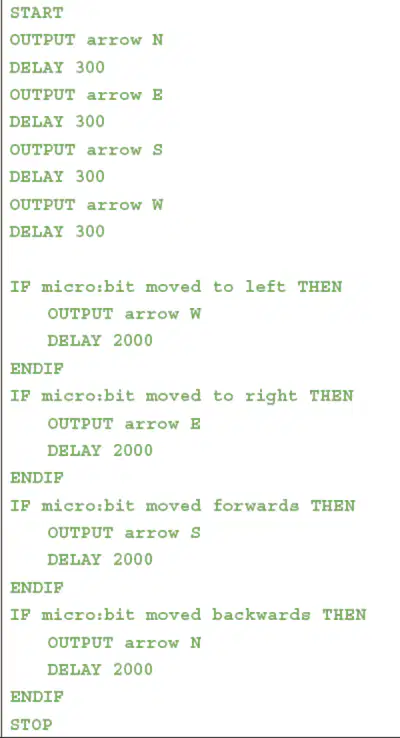
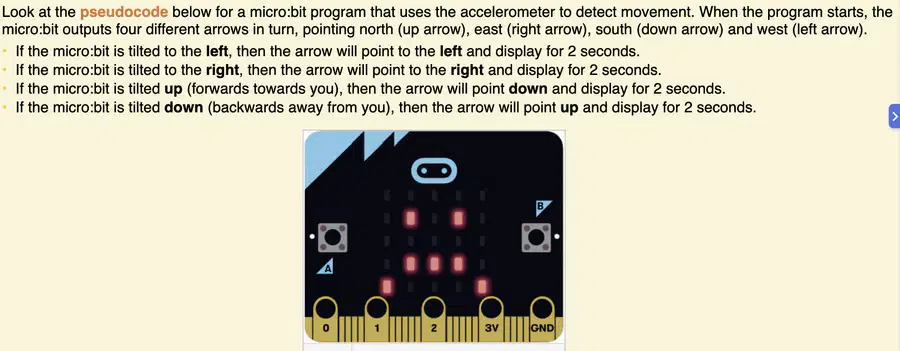
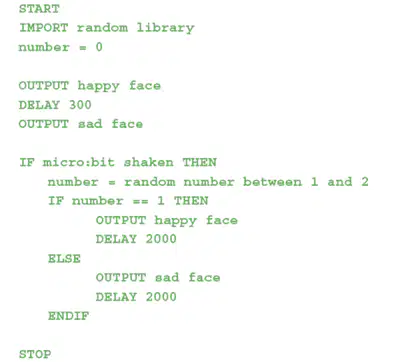
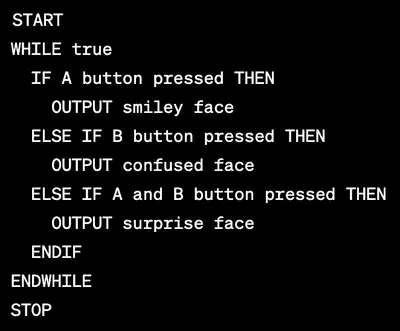
This is the pseudocode (plan):
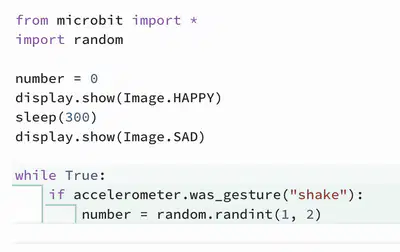
This is an incomplete PythonMicro Code to help you get started

12
For those who can go further
Here's the pseudocode... how do you programme this in PythonMicro

Unit 9.3:
Coding and testing: Game Development for the Micro:bit
Show answer
Auto Play
Slide 1 / 12
SLIDE
Similar Resources on Wayground

10 questions
Programación - Clase 4
Presentation
•
10th Grade
8 questions
BAB 3 - Implementasi Tipe Data C++
Presentation
•
10th Grade
7 questions
3.4 Structure and Function of DNA
Presentation
•
10th Grade
8 questions
HỆ ĐIỀU HÀNH
Presentation
•
11th Grade
12 questions
Introduction Paragraph - Writing Bootcamp
Presentation
•
9th - 10th Grade
7 questions
Знаходження мінімального та максимального значення списку
Presentation
•
9th Grade
8 questions
Music and Sleep
Presentation
•
10th Grade
Popular Resources on Wayground
10 questions
HCS SCI 03 Summer School Review 4

Quiz
•
3rd Grade
11 questions
HSMS - Standard Response Protocol
Quiz
•
6th - 8th Grade
16 questions
1.1-1.2 Quiz Review
Quiz
•
9th - 12th Grade
12 questions
Exponent Expressions
Quiz
•
6th Grade
20 questions
Adding and Subtracting Integers
Quiz
•
6th - 7th Grade
11 questions
Northeast States
Quiz
•
3rd - 4th Grade
10 questions
Characterization
Quiz
•
3rd - 7th Grade
10 questions
Common Denominators
Quiz
•
5th Grade