
Parts of the Microsoft Word Window
Authored by Sandhia Musgrove
Computers
7th Grade
Used 49+ times


AI Actions
Add similar questions
Adjust reading levels
Convert to real-world scenario
Translate activity
More...
Content View
Student View
20 questions
Show all answers
1.
MULTIPLE SELECT QUESTION
45 sec • 1 pt
The big blank area where you can type and work is called - - - -.
Place to type
Work area
Document Pane
Area to type
2.
MULTIPLE CHOICE QUESTION
45 sec • 1 pt
There are two scroll bars, namely, ______ and _____.
straight and curve
horizontal and vertical
laying and standing
horizontal and standing
3.
MULTIPLE CHOICE QUESTION
45 sec • 1 pt
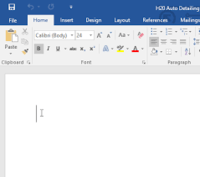
A blinking vertical line in a document that indicates where the next character typed will be placed
4.
MULTIPLE CHOICE QUESTION
45 sec • 1 pt
This is located above the ribbon and offers shortcuts to commonly used tasks
Backstage
Status Bar
Ribbon
Quick Access Toolbar
5.
MULTIPLE CHOICE QUESTION
45 sec • 5 pts
Microsoft Word is a __________.
word processing application
spreadsheet for calculation
presentation program
desktop publishing application
6.
MULTIPLE CHOICE QUESTION
45 sec • 1 pt

What does this button do?
7.
MULTIPLE CHOICE QUESTION
45 sec • 1 pt

Designed to help you quickly find the commands that you need to complete a task. Commands are organized in logical groups, which are collected together under tabs.bar


Access all questions and much more by creating a free account
Create resources
Host any resource
Get auto-graded reports

Continue with Google

Continue with Email

Continue with Microsoft
or continue with

%20(1).png)
Apple

Others
By signing up, you agree to our Terms of Service & Privacy Policy
Already have an account?

