

COMP3421-L2

Presentation
•
Computers
•
University
•
Practice Problem
•
Medium

COMP 3421
Used 2+ times
FREE Resource
23 Slides • 5 Questions
1
COMP3421
Lecture 2 - Styles
2
Poll
Di you study slides of lecture 2 before coming to the lecture today?
Yes
No
3
Poll
What you think about last lecture, basics and HTML
Too Easy, need to discuss more in-depth during lecture
Easy, understood everything
Alright, almost understood everything
Difficult, only understood few topics, mostly unclear
Hard, understood almost nothing
4

Start our story from attribute of ‘style’
One or more style properties and values separated by semicolons.
<html>
<body>
<h1 style="color:blue;text-align:center;">This is a
header</h1>
<p style="color:green;">This is a paragraph.</p>
</body>
</html>
Style=“color:blue; font-size: 18px”
property
declaration
declaration
value
property
value
5
Multiple Choice
Which one of the following is the right way to change background color of H1
<h1 style='background-color:pink;'>
<h1 background-color='pink;'>
<h1 style='bgcolor:pink;'>
<h1 style='color:pink;'>
<h1 style:'background-color:pink;'>
6

Colors
Colors in are most often specified by:
• a valid color name, like "red”.
• an RGB value, like “rgb(255, 0, 0)”. RGB color values can be specified
using this formula: rgb(red, green, blue). Each parameter (red,
green, blue) defines the intensity of the color between 0 and 255.
• a HEX value, like “#ff0000”. #RRGGBB, where RR (red), GG (green)
and BB (blue) are hexadecimal values between 00 and FF (same as
decimal 0-255).
https://www.w3schools.com/colors/colors_picker.asp
7
Fill in the Blanks
Type answer...
8

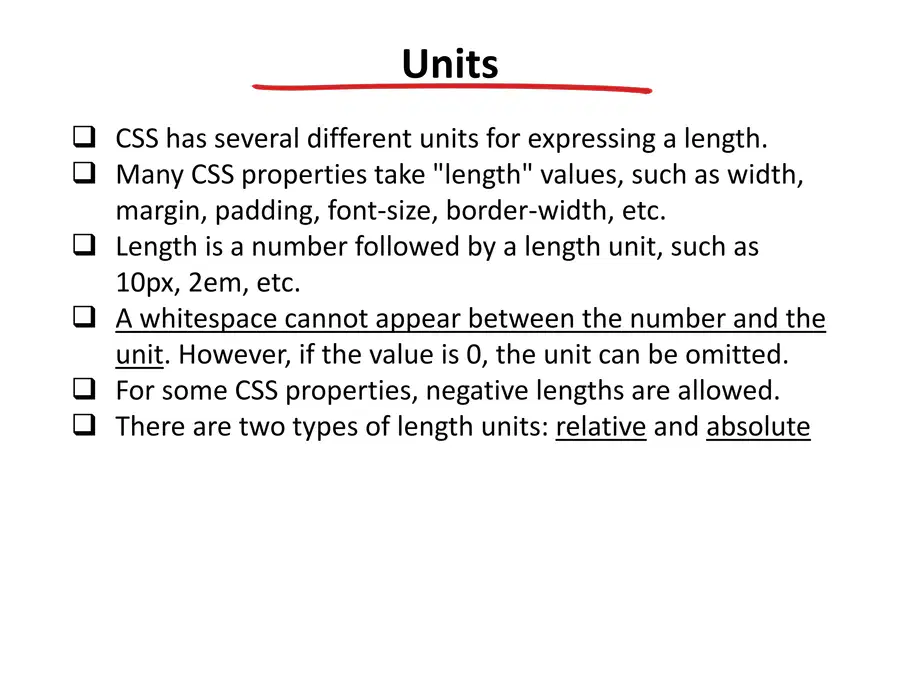
Units
CSS has several different units for expressing a length.
Many CSS properties take "length" values, such as width,
margin, padding, font-size, border-width, etc.
Length is a number followed by a length unit, such as
10px, 2em, etc.
A whitespace cannot appear between the number and the
unit. However, if the value is 0, the unit can be omitted.
For some CSS properties, negative lengths are allowed.
There are two types of length units: relative and absolute
9

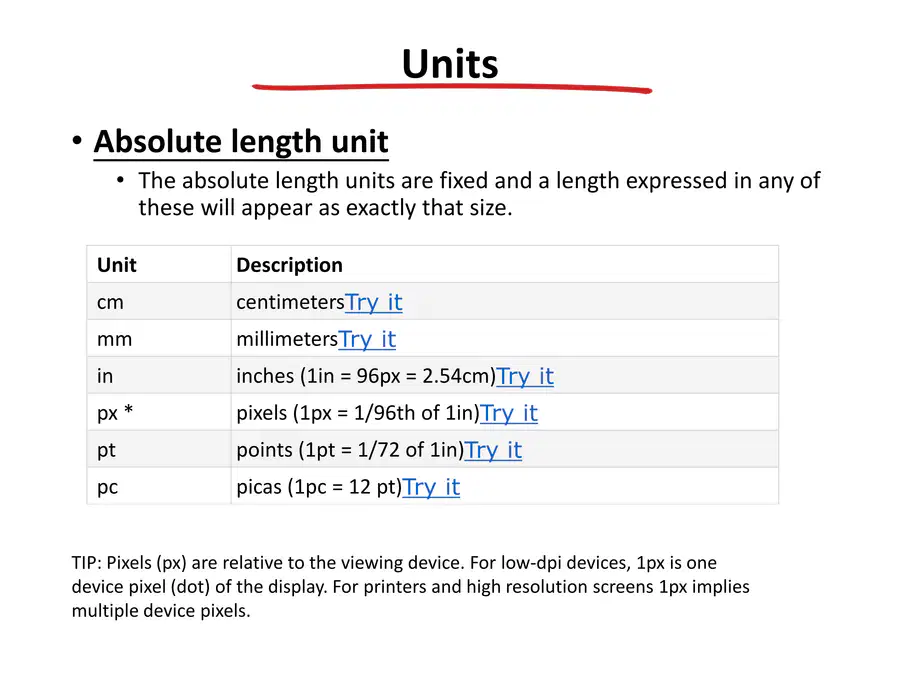
Units
• Absolute length unit
• The absolute length units are fixed and a length expressed in any of
these will appear as exactly that size.
Description
Unit
centimetersTry it
cm
millimetersTry it
mm
inches (1in = 96px = 2.54cm)Try it
in
pixels (1px = 1/96th of 1in)Try it
px *
points (1pt = 1/72 of 1in)Try it
pt
picas (1pc = 12 pt)Try it
pc
TIP: Pixels (px) are relative to the viewing device. For low-dpi devices, 1px is one
device pixel (dot) of the display. For printers and high resolution screens 1px implies
multiple device pixels.
10

Units
• Relative length unit
• Relative length units specify a length relative to another length
property. Relative length units scales better between different
rendering mediums.
Description
Unit
Try it
Relative to the font-size of the element (2em means 2 times the size of the current
font)
em
Try it
Relative to the x-height of the current font (rarely used)
ex
Try it
Relative to width of the "0" (zero)
ch
Try it
Relative to font-size of the root element
rem
Try it
Relative to 1% of the width of the viewport*
vw
Try it
Relative to 1% of the height of the viewport*
vh
Try it
Relative to 1% of viewport's* smaller dimension
vmin
Try it
Relative to 1% of viewport's* larger dimension
vmax
Try it
Relative to the parent element
%
Tip: The em and rem units are practical in creating perfectly scalable layout!
* Viewport = the browser window size. If the viewport is 50cm wide, 1vw = 0.5cm.
11

TIP: X-Height
12

Text
Text Color (color)
• The color property is used to set the color of the text.
Text Alignment (text-align)
• The text-align property is used to set the horizontal
alignment of a text.
• A text can be left or right aligned, centered, or
justified.
Text Decoration (text-decoration)
•The text-decoration property is used to set or remove
decorations from text.
• The value text-decoration: none; is often used to
remove underlines from links:
• A text can be with overline, line-through, underline
Text Transform (text-transform)
• The text-transform property is used to specify
uppercase and lowercase letters in a text.
• It can be used to turn everything into uppercase or
lowercase letters, or capitalize the first letter of each
word:
h1 {
color: green;
}
h1 {
text-align: center;
}
h1 {
text-decoration: overline;
}
p {
text-transform: capitalize;
}
13

Text
Text Indentation (text-indent)
• The text-indent property is used to specify
the indentation of the first line of a text.
Letter Spacing (letter-spacing)
• The letter-spacing property is used to
specify the space between the characters in
a text.
Line Height (line-height)
• The line-height property is used to specify
the space between lines.
Text Direction (direction)
• The direction and unicode-bidi properties
can be used to change the text direction of
an element.
p {
text-indent: 50px;
}
h1 {
letter-spacing: 3px;
}
p.big {
line-height: 1.8;
}
p {
direction: rtl;
unicode-bidi: bidi-override;
}
direction: ltr|rtl|initial|inherit;
14

Text
Word Spacing (word-spacing)
• The word-spacing property is used to
specify the space between the words in
a text.
Text Shadow (text-shadow)
• The text-shadow property adds shadow
to text. The example specifies the
position of the horizontal shadow (3px),
the position of the vertical shadow (2px)
and the color of the shadow (red).
Text Overflow (text-overflow)
• Specifies how overflowed content that is
not displayed should be signaled to the
user.
h1 {
word-spacing: 10px;
}
h1 {
text-shadow: 3px 2px
red;
}
div {
white-space: nowrap;
overflow: hidden;
text-overflow: ellipsis;
}
text-overflow: clip|ellipsis|string|initial|inherit;
15

Font
Description
Property
Sets all the font properties in one declaration
font
Specifies the font family for text
font-family
Specifies the font size of text
font-size
Specifies the font style for text
font-style
Specifies whether or not a text should be displayed in a small-
caps font
font-variant
Specifies the weight of a font
font-weight
16

Font
Font Family
• The font family of a text is set with the font-family property. The font-
family property should hold several font names as a "fallback" system. If
the browser does not support the first font, it tries the next font, and so on.
p {
font-family: "Times New Roman", Sans-serif, serif;
}
17

Font
Font Size
• The font-size property sets the size of the text. The font-size value can be
an absolute, or relative size.
• Absolute size:
• Sets the text to a specified size
• Does not allow a user to change the text size in all browsers (bad for
accessibility reasons)
• Relative size:
• Sets the size relative to surrounding elements. Allows a user to change
the text size in browsers.
• The em size unit is recommended by the W3C. 1em is equal to the
current font size. The default text size in browsers is 16px. So, the
default size of 1em is 16px. The size can be calculated from pixels to
em using this formula: pixels/16=em
• https://www.w3schools.com/css/tryit.asp?filename=trycss_font-size_em
p {
font-size: 14px;
}
18

Font
Font Size
• Relative size:
• The text size can be set with a vw unit, which means the “viewport
width”. The text size will follow the size of the browser window:
• Viewport is the browser window size. 1vw = 1% of viewport width. If
the viewport is 50cm wide, 1vw is 0.5cm.
<h1 style="font-size:10vw">Hello World</h1>
https://www.w3schools.com/css/tryit.asp?filename=trycss_font_responsive
19

Font
Font Style
• The font-style property is mostly used to specify italic text.
• This property has three values:
• normal - The text is shown normally
• italic - The text is shown in italics
• oblique - The text is "leaning" (oblique is very similar to italic, but less
supported)
https://www.w3schools.com/css/tryit.asp?filename=trycss_font-style
20

Text
Font Variant
• The font-variant property specifies whether or not a text
should be displayed in a small-caps font.
font-variant: normal|small-caps|initial|inherit;
Description
Value
The browser displays a normal font. This is default
normal
The browser displays a small-caps font
small-caps
Sets this property to its default value. Read about initial
initial
Inherits this property from its parent element. Read about inherit
inherit
https://www.w3schools.com/cssref/tryit.asp?filename=trycss_font-variant
21

Text
Font
• Set some font properties with the shorthand declaration:
p.a {
font: 15px arial, sans-serif;
}
p.b {
font: 12px
bold Georgia, serif italic;
}
22
Word Cloud
When selecting a font style, why do we provide multiple font names, instead of just a single one?
23

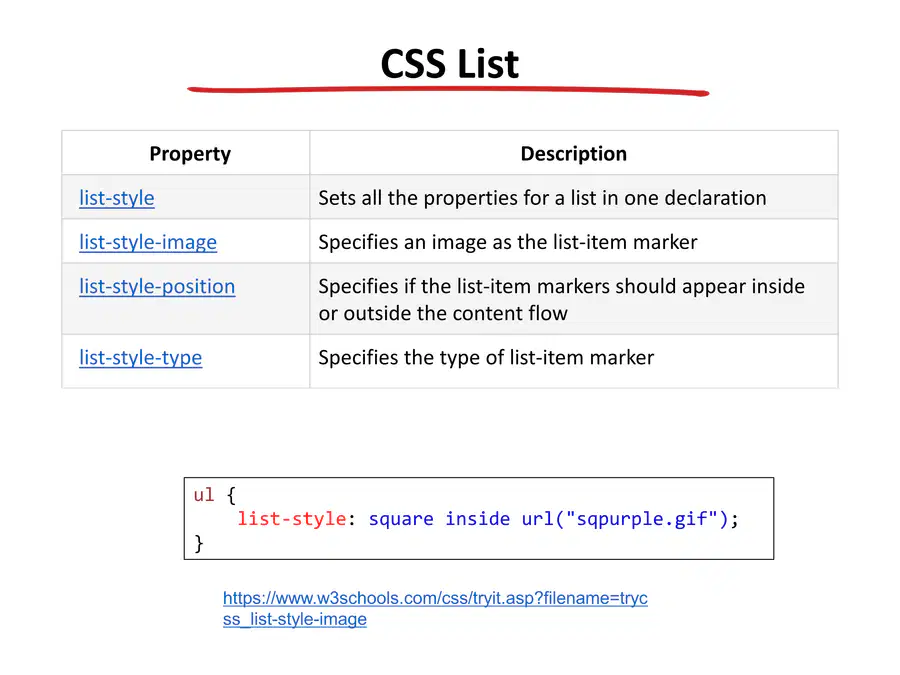
CSS List
Description
Property
Sets all the properties for a list in one declaration
list-style
Specifies an image as the list-item marker
list-style-image
Specifies if the list-item markers should appear inside
or outside the content flow
list-style-position
Specifies the type of list-item marker
list-style-type
ul {
list-style: square inside url("sqpurple.gif");
}
https://www.w3schools.com/css/tryit.asp?filename=tryc
ss_list-style-image
24

CSS Table
Description
Property
Sets all the border properties in one declaration
border
Specifies whether or not table borders should be collapsed
border-collapse
Specifies the distance between the borders of adjacent cells
border-spacing
Specifies the placement of a table caption
caption-side
Specifies whether or not to display borders and background on empty
cells in a table
empty-cells
Sets the layout algorithm to be used for a table
table-layout
https://www.w3schools.com/css/tryit.asp?filename=tryc
ss_table_responsive
25
26

27
28
COMP3421
Lecture 2 - Styles
Show answer
Auto Play
Slide 1 / 28
SLIDE
Similar Resources on Wayground

20 questions
Presentation tips
Presentation
•
University
20 questions
An introduction to ReactJS State
Presentation
•
University
20 questions
Part of computer
Presentation
•
KG
22 questions
PARTICIPIAL ADJECTIVES
Presentation
•
University
20 questions
AI dan Design Grafis
Presentation
•
University
19 questions
INGLES 1 - Sesión 2 Greetings and Farewells
Presentation
•
University
23 questions
Seminario Día 1
Presentation
•
University
22 questions
ติว o-net ม.3
Presentation
•
KG
Popular Resources on Wayground
24 questions
PBIS-HGMS Day 10

Quiz
•
6th - 8th Grade
10 questions
HCS SCI 03 Summer School Review 3
Quiz
•
3rd Grade
11 questions
Home Scope
Quiz
•
7th - 8th Grade
15 questions
HCS SCI 05 Summer School Assessment 3 Review
Quiz
•
5th Grade
35 questions
Lufkin Road Middle School Student Handbook & Policies Assessment
Quiz
•
7th Grade
18 questions
Geo 11.3 Area of Circles and Sectors
Quiz
•
9th - 11th Grade