

Searching Algorithms

Presentation
•
Computers
•
10th - 11th Grade
•
Practice Problem
•
Easy

Ryan Mordey
Used 5+ times
FREE Resource
10 Slides • 8 Questions
1
Searching Algorithms
Mr Mordey
2
Big Picture
Described control structures can be used in algorithms.
Past
Describe techniques that can be used for a searching algorithm.
Demonstrate a range of searching algorithms and evaluate their characteristics.
Present
Future
Careers: Software Developer, Programmer.
3

An algorithm is a step by step set of instructions for a computer to follow.
There are many different methods that can be used to search for data in a computer.
Some algorithms are more efficient at finding data or some are simpler to program. The two techniques you need to know for the exam are:
Searching Algorithms
Linear Search
Binary Search
4
Finds the middle point of the search list. Halves the list each time until it finds the value you are searching for.
List must be sorted to work but works efficiently on large lists, bit is more complex to program.
Binary Search
Searches through one index at a time until it finds the desired item.
Stops the search after it finds the first value. Easy to program but inefficient on large lists.
Linear Search
Overview Comparison
5
Multiple Select
What are the two searching algorithms you must know for your exam?
Tree Search
Linear Search
Index Search
Denary Search
Binary Search
6
Categorize
Searches through index one at a time
List can be any order
Inefficient on large lists
Easier to program
Halves the list each time until left with the value
List must be sorted to work
Efficient on large lists
More complex to code
Drag the correct characteristic to each searching algorithm
7
Linear Search
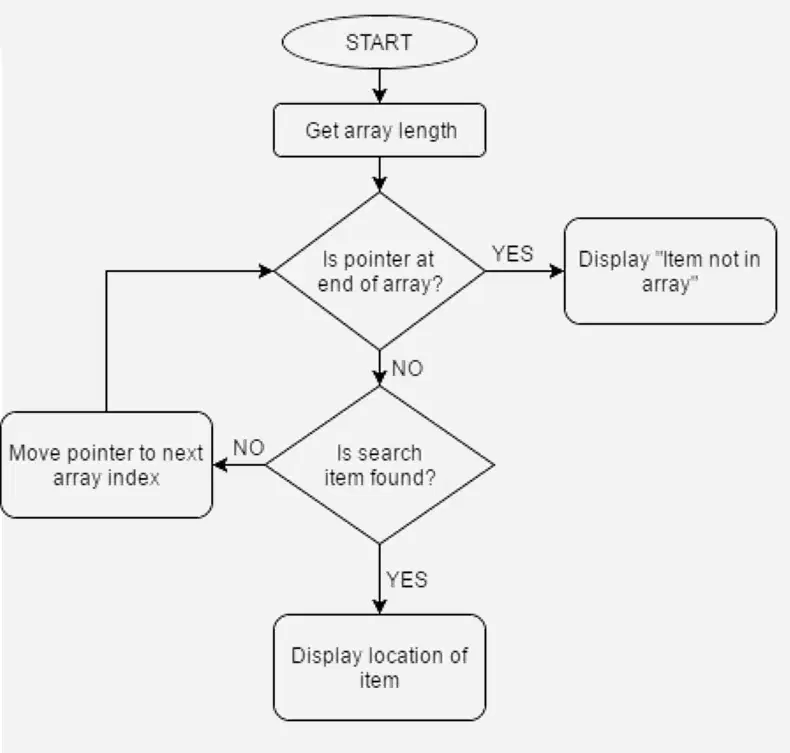
If we use the list below and search for D. The algorithm will start at index 0, it will check to see if D is at position 0.
If not it will move on to index location 2. It will continue this process until index 4. It has found the search will stop and it will display the location.
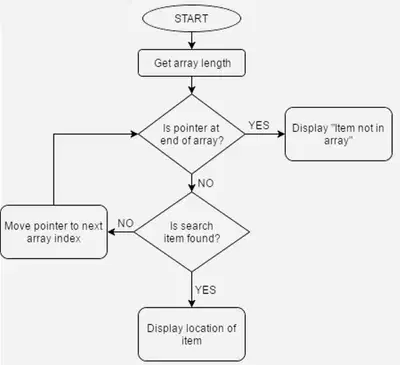

Flowchart of a linear search
8
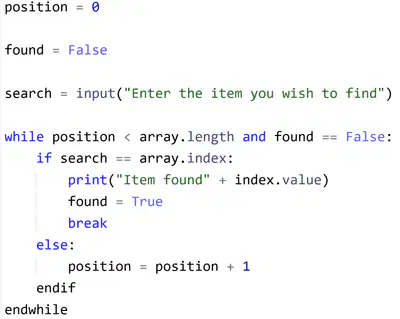
Linear Search
You do not need to remember the code for this algorithm but you must be able to recognise it.
The first variable ensures that the search starts at 0. The second variable is a flag to make sure the search will continue. The third variable asks for the user to enter their value they wish to find.
Condition controlled iteration is used to repeat the search. Whilst the position is less than the list length and found is false the search will continue
In the loop we use selection, if the search item is in the array index, we print the item and set found to true, we can then break the loop. Else we increase the position by 1 to the next index.
9
Open Ended
Describe how a linear search works.
10
Multiple Choice
Why is a linear search algorithm now always the best technique to use?
11
Binary Search
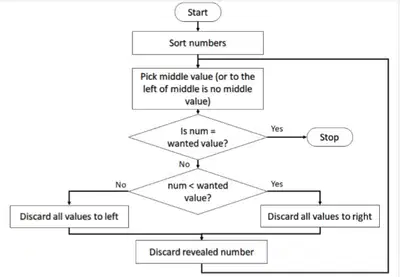
Binary search also known as divide and conquer is more efficient for larger lists but can only be done on a ordered list.
We find the middle value of the list. If the list is of 50 numbers we would find the value at index 25. If the number we searched is higher we disregard 0-25 and repeat the technique with 26-50
This continues until we are left with the searched value.
Flowchart of a linear search
12
Binary Search
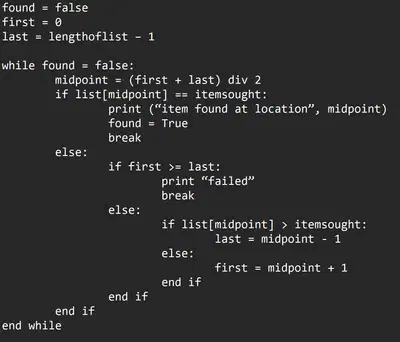
You do not need to remember the code for this algorithm but you must be able to recognise it.
The code here looks a lot more complex. To work out the midpoint you must find the first position and the last position. To find the last value you use the listname - 1
The main thing you are looking for to recognise a binary search, is the variable midpoint or midvalue. You should recognise the code immediately as it is a lot more complex.
Reminder binary search can only be carried out a sorted list.
13
Fill in the Blanks

14
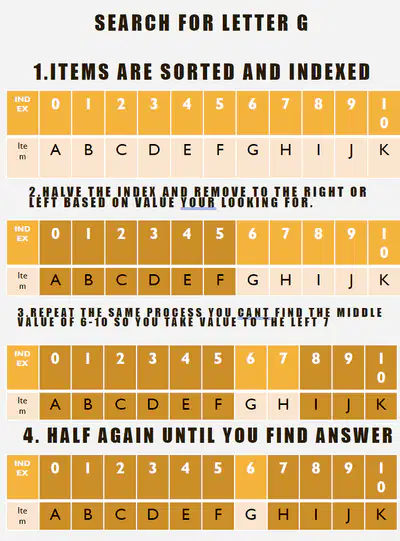
Binary Search
You may need to demonstrate the search. Here we search for G.
To work out middle value add first and last position and divide by 2. Here it is 0 + 10 / 2= 5.
G is in position 6 so we disregard all values from 0-5 and repeat. 6 + 10 / 2 = 8.G is in position 6 so we disregard the right side of the list. We repeat again to desired value.
Written example
15
Drag and Drop
16
Open Ended
Why cant you always perform a binary search?
17
Fill in the Blanks
18
Main Task
Computer Task:
Create an algorithm PowerPoint that summarises the information for each search technique. You should have a written description of how the search works including the benefits and drawbacks.
Use the internet to find pseudocode and flowcharts to represent each search algorithm. Analyse the code on each to identify the main give aways of each.
Complete all the questions on the work sheet.
Searching Algorithms
Mr Mordey
Show answer
Auto Play
Slide 1 / 18
SLIDE
Similar Resources on Wayground

12 questions
Stay Hydrated
Presentation
•
10th - 11th Grade
14 questions
Solving Exponentials using Logarithms!
Presentation
•
10th - 11th Grade
15 questions
Y1 ICT Topic: Inserting Online Pictures in the Spreadsheet
Presentation
•
KG
15 questions
Author's Purpose
Presentation
•
10th - 11th Grade
15 questions
Graphic Design: Software
Presentation
•
9th - 12th Grade
14 questions
AP CSP Unit 1 Test Review
Presentation
•
10th - 12th Grade
12 questions
READING COMPREHENSION
Presentation
•
10th - 11th Grade
12 questions
Prepositions
Presentation
•
3rd Grade
Popular Resources on Wayground
24 questions
PBIS-HGMS Day 10

Quiz
•
6th - 8th Grade
10 questions
HCS SCI 03 Summer School Review 3
Quiz
•
3rd Grade
11 questions
Home Scope
Quiz
•
7th - 8th Grade
15 questions
HCS SCI 05 Summer School Assessment 3 Review
Quiz
•
5th Grade
35 questions
Lufkin Road Middle School Student Handbook & Policies Assessment
Quiz
•
7th Grade
18 questions
Geo 11.3 Area of Circles and Sectors
Quiz
•
9th - 11th Grade