

Email Security

Presentation
•
Computers
•
4th Grade
•
Practice Problem
•
Medium

Anonymous Anonymous
Used 8+ times
FREE Resource
9 Slides • 19 Questions
1

2
3
Word Cloud
What is email security?
4
A process of preventing email-based cyber attacks and unwanted communications/ Protecting your account
Protecting inbox from takeover
Protecting domain from spoofing
Blocking malware delivery
Filtering spam
Stop phishing attacks
5
Multiple Choice
Which of the following is NOT a suggestion made by the security team?
Having regular ID card checks
Employing extra security staff
Putting in more CCTV
Offering free meals to students
6
Multiple Choice
Which of the following measures is considered most effective by the security team?
Conducting surprise security drills
Implementing a biometric access system
Increasing the height of perimeter fence
Installing more bright lights around campus
7
Multiple Choice
An __________ scans and processes all incoming and outgoing email and makes sure that threats are not allowed in.
email gateway
email profile picture
email username
none
8
Multiple Choice
What is the MOST common delivery method for viruses?
Poster
9
Multiple Choice
If someone asks for your bank account information, what should you do?
Exchange it for money.
Don't give it to them.
Give it to them.
10
Multiple Choice
Identity theft is a crime in which your private information is stolen and used for ________ activity.
Criminal
Reporter
News
Hidden
11

Phishing
Fraud
Malware
Email
Interception
Account
Takeover
1
4
3
2
5
Type of Email Attacks
12
Malware
1
Software that is designed to attack, control, and damage a device's security and infrastructure
Trojan Horse
Viruses
Worms
Spyware
Ransomware
13
14
Multiple Choice
What is malware?
A type of bird
A type of fish
Software designed to harm your computer or steal your information
A gardening tool
15
Phishing
2
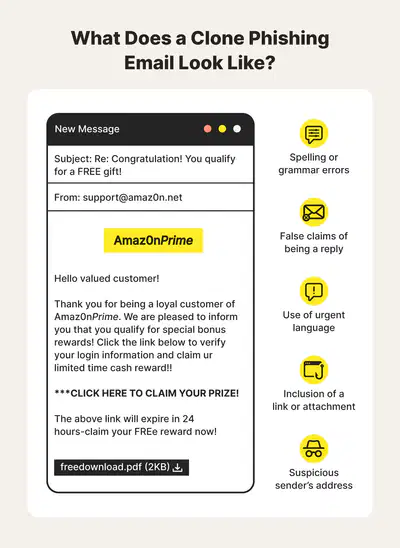
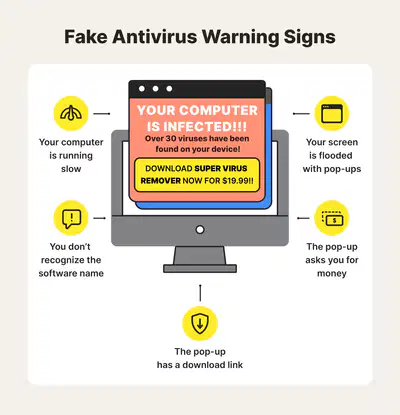
Scammers use fake websites that resemble legitimate ones to trick users into revealing their personal information.
16
17
18
Multiple Choice
What kind of attachments might contain malware?
PDF files
Executable files (e.g., .exe, .bat)
Image files
Text files
19
Multiple Choice
Keyloggers are a form of ______________.
Social engineering
Trojan
Shoulder surfing
Spyware
20
Multiple Choice
How can you identify a phishing email?
It contains spelling and grammar errors
The email address of the sender looks suspicious
It asks for sensitive information like passwords or credit card numbers
All of the above
21
Multiple Choice
Which of the following is NOT a common type of malware?
Trojan horse
Spyware
Panda
Ransomware
22
Multiple Choice
How do phishers typically contact their targets?
Via email, text messages, or phone calls
By sending physical letters
By appearing at their doorstep
Through phone calls only
23
Multiple Choice
What can happen if you fall for a phishing scam?
Your personal information could be stolen or misused
Your computer will run faster
You might receive free gifts
You'll become famous
24
Multiple Choice
What is phishing?
A popular social media platform
A type of fishing technique
A fraudulent attempt to obtain sensitive information
A type of bird commonly found in coastal regions
25
Multiple Choice
Which action helps protect you from falling victim to phishing attacks?
Never click on links or download attachments from unknown senders
Share your passwords with friends to keep them safe
Respond to emails requesting personal information to avoid penalties
Keep your antivirus software turned off for better performance
26
Multiple Choice
Email is often used to spread malware ______________ attacks
brute force
birthday
fraud and phishing
Front door
27
Multiple Choice
Which of the following attacks is conducted by posing as a legitimate entity in order to solicit sensitive information from users?
Insider
Hacking
Phishing
Fraud
28
Multiple Choice
Phishing is a way of attempting to acquire information. What information does it try to acquire?
Select two answer.
Level of education
User names and passwords
Marital status
Credit card details
Show answer
Auto Play
Slide 1 / 28
SLIDE
Similar Resources on Wayground

24 questions
Computer Basics Grade 4
Presentation
•
3rd - 4th Grade
20 questions
Part of computer
Presentation
•
KG
21 questions
Privacy and Security
Presentation
•
3rd - 4th Grade
19 questions
Main Idea Review
Presentation
•
4th Grade
25 questions
Progressive Tense Verbs
Presentation
•
4th Grade
21 questions
Password Power-Up
Presentation
•
4th Grade
20 questions
G4-Skill 1 + 2 - Web address & search engines
Presentation
•
4th Grade
20 questions
Weather Maps Part 1
Presentation
•
4th Grade
Popular Resources on Wayground
10 questions
Safety Day 2026 – Student Review

Quiz
•
9th Grade
21 questions
Continents and Oceans
Quiz
•
6th Grade
20 questions
Parts of Speech
Quiz
•
5th Grade
16 questions
Subject & Predicate
Quiz
•
5th Grade
25 questions
Multiplication Facts
Quiz
•
5th Grade
12 questions
Map Skills
Quiz
•
3rd Grade
22 questions
Continents and Oceans
Quiz
•
5th Grade
15 questions
Rounding Decimals
Quiz
•
5th Grade
Discover more resources for Computers
20 questions
Inferences
Quiz
•
4th Grade
20 questions
Multiplication and Division Facts
Quiz
•
4th Grade
10 questions
3 digit by 1 digit multiplication
Quiz
•
4th Grade
15 questions
Subject/Verb agreement
Quiz
•
4th Grade
21 questions
Multiplication Facts
Quiz
•
4th Grade
10 questions
Subtraction with Regrouping
Quiz
•
4th Grade
8 questions
Context Clues Practice
Quiz
•
4th Grade
10 questions
Multiplication Facts
Quiz
•
4th Grade